Day 1

CS Hardware - Ohm's Law

Goal for Today

By the end of today you will:

  • Build your first circuit
  • Control LED (light emitting diode) brightness using a resistor
  • Use a multimeter to measure voltage, current, resistance, and continuity
  • Learn Ohm's Law
  • Learn how to troubleshoot circuits

Today's Workflow

Step 1

Build a circuit virtually in Tinkercad

Step 2

Build the same circuit physically on a breadboard

Step 3

Measure and analyze the circuit

Live Demo

What are we building today?

Why Start with Tinkercad?

Advantages:

  • easier wiring + troubleshooting
  • instant feedback
  • safer experimentation
  • no damaged components

Disadvantages:

  • Simulations are sometimes inaccurate

Electronics Is About Control

We use electronics to control:

  • Light 💡
  • Motion 🚗
  • Sound 🔊
  • Information ℹ️
  • Energy ⚡

Expect mistakes

Your circuit may:

  • not work
  • work partially
  • behave strangely

Professional engineers spend huge amounts of time debugging.

If your circuit does not work immediately THAT IS NORMAL

LAB BREAKOUT #1

Tinkercad Build

Components:

  • battery
  • resistor
  • LED
  • wires

Goal: make the LED light safely

What Is Electricity?

Electricity is the movement of electrons.

Three important ideas:

  • Voltage (V)
  • Current (I)
  • Resistance (R)

Voltage

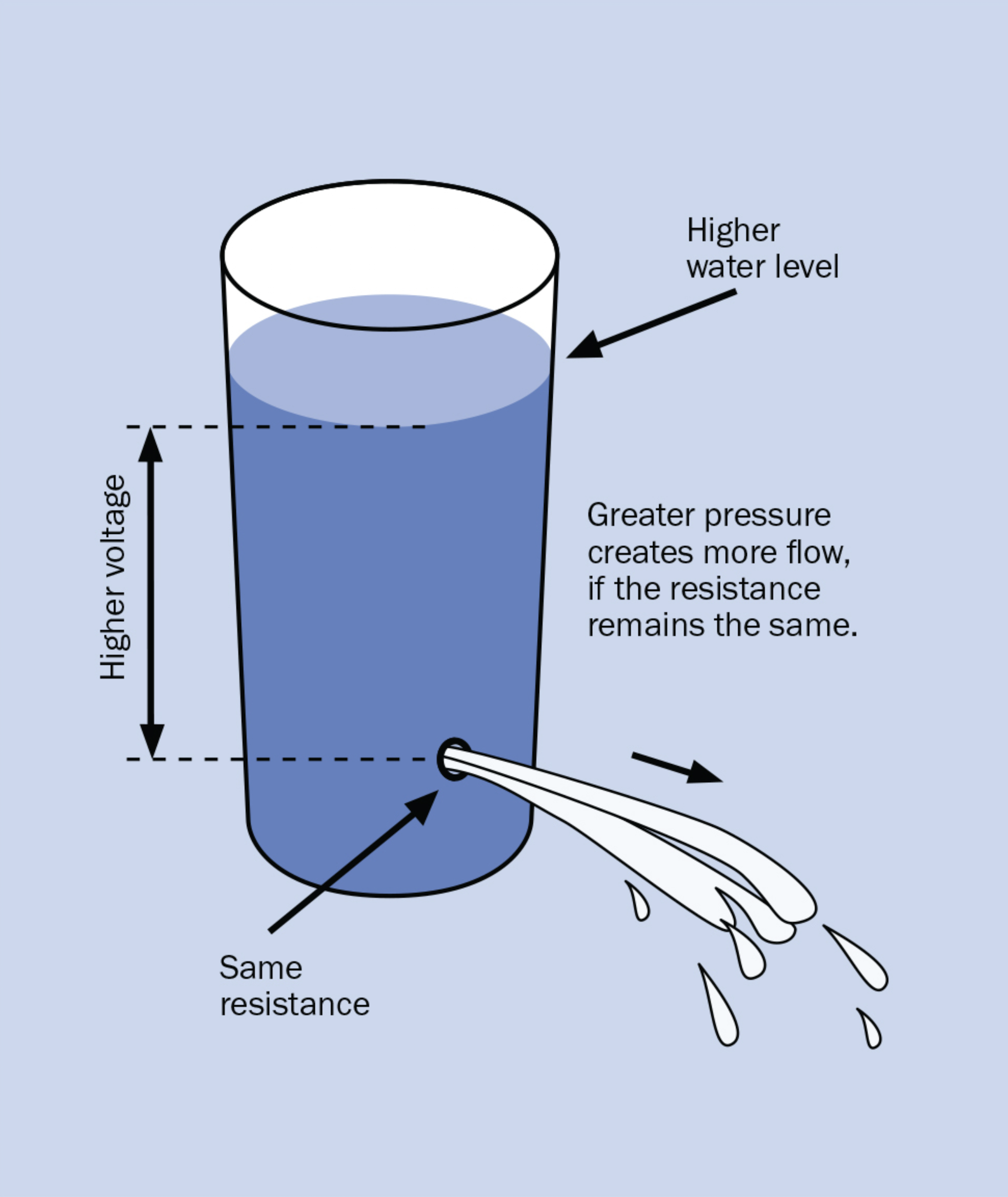
Voltage is electrical pressure

Voltage pushes electrons through a circuit.

Analogy:

  • water pressure in a pipe

Measured in:

Volts (V)

Current

Current is flow

Current is the movement of electrical charge.

Analogy:

  • water flowing through a pipe

Measured in:

Amps (A)

Resistance

Resistance opposes current flow

Higher resistance:

  • less current

Lower resistance:

  • more current

Measured in:

Ohms (Ω)

Water Analogy

Electricity Water
Voltage Pressure
Current Flow
Resistance Narrow pipe

The Battery

A battery provides voltage.

Battery terminals:

  • Positive (+)
  • Negative (-)

Polarity

Direction matters

  • Electricity flows through a circuit in a direction
  • Some components only work when electricity flows the correct way

This is called polarity

LEDs Have Polarity

LED:

  • Light Emitting Diode

Diodes only allow current in one direction.

  • Long leg = positive (+) anode
  • Short leg = negative (-) cathode

What Happens Without a Resistor?

  • We use a resistor to safely limit current.
  • This protects the LED from too much current.

An LED connected directly to a battery can:

  • draw too much current
  • overheat
  • burn out

Battery Safety

Large batteries can produce a dangerous levels of current.

Do NOT short:

  • lithium batteries
  • car batteries

Safety

  • Disconnect power before rewiring
  • Avoid short circuits
  • Wear safety glasses
  • Check polarity

Troubleshooting

If it does NOT work:

  • check polarity
  • check wiring
  • check loose connections
  • swap components
  • test battery

(sometimes you just need to take a break)

LAB BREAKOUT #2

Physical Breadboard Build

Recreate the same circuit physically.

Goal:

  • LED lights
  • correct polarity
  • clean wiring

Compare Virtual vs Physical

What are your first impressions?

The Multimeter

Most important electronics tool

A multimeter measures:

  • voltage
  • resistance
  • current
  • continuity

Instructor Demo

Measure:

  • battery voltage
  • LED voltage
  • current
  • resistance
  • continuity

Measure the Battery

Prediction

What voltage do you expect from a 9V battery?

Now measure it.

Measuring Resistance

Important Rule: POWER OFF FIRST

Resistance is measured on unpowered circuits.

Measure a Resistor

  • Use the multimeter to measure different resistors
  • Compare measured values to color bands.

Measuring Continuity

Continuity means:

  • electrical connection exists

The multimeter beeps when connected.

LAB BREAKOUT #3

Multimeter Measurements

Measure:

  • battery voltage
  • current
  • resistor value
  • continuity

Time:
10–15 minutes

Ohm’s Law

V = I × R

This is one of the most important equations in electronics.

Ohm's Law Intuition

More voltage -> more current

More resistance -> less current

LED Brightness Control

New goal

Control LED brightness using:

  • resistor
  • potentiometer
  • button and/or switch

Potentiometer (Variable resistor)

Turning the knob changes resistance.

Use:

  • Center pin
  • One outside pin
  • Leave the other outside pin disconnected.

Buttons

A button only changes the circuit while pressed.

Examples:

  • keyboard keys
  • doorbells
  • game controller buttons

Switches

A switch stays in its position until changed.

Examples:

  • room light switch
  • power strip
  • flashlight switch

LAB BREAKOUT #4

LED Dimmer

Add the potentiometer.

Goal: control LED brightness

  • What happens as resistance increases?
  • Will brightness increase or decrease?
  • Will the change feel linear?
  • What happens when you add a button and/or switch

Time:
15–20 minutes

Why Does Brightness Change?

  • Brightness depends on current
  • Current depends on resistance

Forward Voltage

  • LEDs are not ordinary resistors.
  • A green LED typically uses about 2.2 V
  • This is called forward voltage

In a 9V circuit:

  • Some voltage appears across the LED
  • The rest appears across the resistor(s)

Example Calculation

Assume:

  • Battery = 9V
  • LED forward voltage = 2.2V
  • Resistance = 500 Ω

Remaining voltage:

9V − 2.2V = 6.8V

Current Calculation

Using Ohm's Law:

I = V / R
I = 6.8V / 500Ω
I = 0.0136 A = 13.6 mA

Important Observation

  • Changing resistance changes current
  • Changing current changes brightness

Heat and Energy

  • Resistors convert electrical energy into heat.
  • LEDs convert energy into light & heat

Key Takeaways

LIVE DEMO

Show physical LED dimmer circuit

Questions: - Why does the LED change brightness? - What controls the current? - Why doesn't the LED burn out?

TODO: move to a breadboard?

We can focus on *understanding the circuit first*

TODO: setup tinkercad classroom

--- # Virtual Circuit Battery positive → Resistor → LED → Battery negative

TODO: insert Tinkercad screenshot

Breadboard?

--- # Before Starting Simulation ## Double check: - LED polarity - resistor present - correct wiring - battery orientation

--- # Prediction Before starting the simulation: - What happens if the LED is reversed? - What happens if the resistor is removed? - Will the LED always light?

--- # Start the Simulation ## What do you observe? - Is the LED on? - Is it bright? - What happens if wiring changes?

--- # Intentional Failure Test Try: - reversing the LED - removing the resistor Observe what changes.

--- # Debrief - Why did reversing the LED matter? - Why was the resistor necessary? - Why did some circuits fail?
![bg contain right](assets/water-analogy.png)

TODO: Ohm's Law here?

--- # Debugging Is Engineering There are: - some ways to wire it correctly - many ways to wire it incorrectly Debugging is part of electronics.

TODO: video showing what happens

TODO: explain a short circuit (too much current)

--- # Engineering Mindset Good engineers: - test - predict - measure - debug - iterate

--- # Build It Physically ## Now recreate the same circuit Using: - Breadboard - LED - Resistor - Battery - Jumper wires

TODO: introduce breadboards in tinkercad first --- # Breadboard ## Rapid circuit prototyping - no soldering - reusable - easy to modify --- # Breadboard Layout ## Rows are electrically connected TODO: Insert breadboard diagram

--- # Physical Circuit Battery positive → Resistor → LED → Battery negative

Tinkercad: - easier wiring - easier visibility Real hardware: - loose wires - bad connections - physical constraints

LIVE DEMO

Show probes placed in parallel vs. series

TODO: Insert diagram measuring voltage, current, resistance, continuity

Test: - jumper wires - buttons - switches - breadboard rows

TODO: image

TODO: image

# LED Dimmer Circuit Battery positive → Fixed resistor → Potentiometer → LED → Battery negative --- # Experiment Time Slowly rotate the potentiometer. Observe: - brightness - smoothness of control ---

--- # Common Mistakes - reversed LED - missing resistor - loose wires - wrong breadboard row - dead battery

# Key Ideas from Today - Voltage pushes current - Resistance limits current - Current controls LED brightness - Polarity matters - Multimeters let us observe circuits

- Why is a resistor needed? - What happens if resistance increases? - What does voltage measure? - Why do LEDs have polarity?

TODO: add slide on buttons / switches

--- # Reach Goals - change the order of components - change resistance / potentiometer - add a button and/or switch

--- # Next Time Next steps: - capacitors - series vs parallel - sensors - transistors